
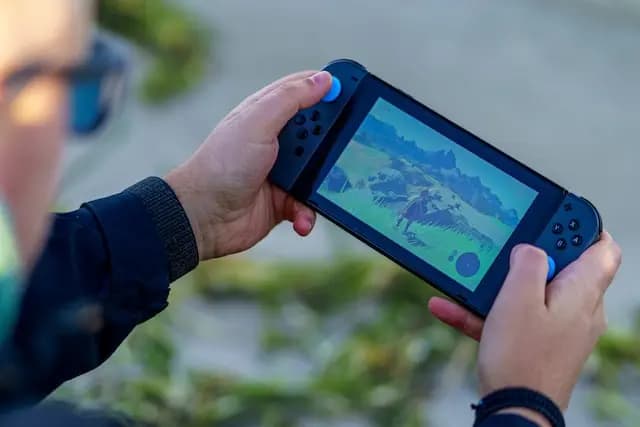
Benefits of Video Gaming for Seniors
Video gaming for seniors offers numerous benefits, including cognitive skill enhancement and opportunities for social connection. Games that require strategic thinking or problem-solving can help keep the brain active and engaged, potentially slowing cognitive decline. Moreover, many games provide platforms for social interaction, allowing seniors to connect with others and combat feelings of isolation.
Enhancing Cognitive Skills and Social Connections
Top Fun Video Games for Seniors
A relaxing game where players create and manage their island paradise. Its easy pace and creative freedom make it ideal for seniors.
Animal Crossing: New Horizons
This farming simulation game is perfect for those who enjoy a slower-paced, nurturing gaming experience.
Stardew Valley
A life simulation game where players can create and manage characters, build homes, and explore various life scenarios. It's excellent for creativity and storytelling.
The Sims 4
A classic puzzle game that's simple to understand but challenging to master. It's great for cognitive exercise and can be played at a leisurely pace.
Bejeweled
This collection of sports games on the Nintendo Wii encourages physical activity in a fun and accessible way, with options like bowling and tennis.
Wii Sports
A casual puzzle game that combines luck and skill. Players aim and shoot balls at colorful pegs, which is both entertaining and mentally stimulating.
Peggle
A timeless puzzle game that challenges players to fit falling blocks into lines. It's great for problem-solving and can be played at various difficulty levels.
Tetris
A creative building game that allows players to construct worlds out of blocks. It's excellent for imaginative play and can be played in a peaceful creative mode.
Minecraft
A digital version of Scrabble that can be played with friends online. It's perfect for word enthusiasts and helps maintain language skills.
Words With Friends
A fun and easy racing game with beloved characters from the Mario universe. It's great for light-hearted competition and can be played with family members of all ages.
Mario Kart
Designed to train the brain with various puzzles and problems, it's perfect for seniors looking to keep their minds sharp.
Brain Age
A strategy game where players use plants to defend their home from a zombie attack. It requires strategic thinking but is easy to grasp.
Plants vs. Zombies
An artistic and emotional exploration game that's both simple and profound. It allows for a serene gaming experience, perfect for relaxation.
Journey
A popular puzzle game with thousands of levels. It's easy to learn and offers satisfying gameplay.
Candy Crush Saga
The classic card game is available digitally and is perfect for a relaxing solo gaming experience.
Solitaire
A visually stunning puzzle game that challenges players to navigate through mazes of optical illusions and impossible objects.
Monument Valley
An underwater exploration game that's more about experiencing beauty and serenity than challenging gameplay.
Abzû
An adventure game with a strong narrative focus, featuring exploration and mystery in a beautiful natural setting.
Firewatch
A mobile version of the popular Animal Crossing game, offering a relaxed pace and friendly environment to engage with nature and friends.
Animal Crossing: Pocket Camp
A strategy game where players build and manage their own civilization. It's great for seniors interested in history and strategy, offering a deeper gaming experience.
Sid Meier's Civilization VI
How Gaming Can Be a Social Activity for Seniors
Video games can be a great way for seniors to engage in social activities. Multiplayer games and online gaming communities provide platforms for seniors to interact, collaborate, and form connections with fellow gamers across the world.
Building Connections Through Interactive Play
Tips for Choosing Video Games Based on Interests and Abilities
When choosing video games, it’s important for seniors to consider their interests and abilities. Games come in various genres, from puzzles and strategy to adventure and simulation. Seniors should select games that align with their interests and don't require complex controls or fast reflexes if that's a concern.
Selecting the Right Game for Enjoyment and Comfort
Understanding the Different Genres of Video Games
Exploring different genres helps in finding the perfect game. Puzzle games, for example, are great for cognitive exercise, while adventure games can provide an immersive storytelling experience.
Finding the Perfect Match for Every Senior Gamer
The Role of Technology in Enhancing Gaming Experience
With advancements in technology, many games are now more accessible and user-friendly for seniors. Platforms like tablets and smartphones offer games that are easy to understand and play.
Embracing User-Friendly Gaming Platforms
Overcoming Challenges in Learning New Games
For seniors new to gaming, learning to play can be a challenge. However, with guidance and patience, they can gradually become comfortable with gaming mechanics and enjoy the experience.
Guidance and Patience in Gaming
The Therapeutic Benefits of Video Gaming for Seniors
Video gaming can also have therapeutic benefits for seniors, serving as a tool for stress relief and mental stimulation. Games with calming environments or creative tasks can provide a serene escape and enhance emotional well-being.
Gaming as a Tool for Mental and Emotional Well-being
Incorporating Gaming into Daily Routines for Active Aging
Gaming isn’t just for the young—seniors can enjoy fun and easy video games that stimulate the mind, improve coordination, and foster social connections. Games like puzzles, word games, and interactive adventures are excellent for enhancing cognitive function and providing joy in everyday life. Zocvi champions activities that promote mental and emotional well-being for seniors, and gaming is a wonderful way to do just that! Interested in exploring more engaging activities tailored for seniors? Schedule a 15-minute call with our experts to learn how we can help. Call us at +91-92724-57637.
Balancing Gaming with Everyday Life
About Zocvi
Zocvi connects patients with verified doctors and evidence-based health guidance. Visit zocvi.com or reach us on WhatsApp at +91-92724-57637.









Comments (0)